 News Feed
  Blog
Blog  Explore
  Events
  Forum
Forum  Jobs
Jobs  Network
When developing applications in cloud, it’s less worrying about the underlying infrastructure as it is managed for us. Creating a few microservices and getting them up and running in cloud is really easy and seamless.
When we build cloud applications, we lose some aspect of control. Having the source code of microservices in a source control is not enough to get the overall system up and running in a new environment. The code is only part of the overall system. The infrastructure needs to be built manually such as creating runtime environments to run the code and an API Gateway to access it.
What’s the solution for this? Infrastructure as Code! Well as the name implies, using this method, it’s possible to represent the overall cloud system as Code.
There are several Frameworks/Tools for this,
- Serverless Framework
- AWS CloudFormation
- AWS The Serverless Application Model (SAM)
- ZAPPA
- Claudia.js
- Terraform
In this guide “Serverless Framework” will be used as it is cloud agnostic and supports many cloud platforms such as AWS, Azure and Google Cloud. You can find a comparison with other frameworks from this link.
I will provide a walkthrough on configuring a cloud system in Serverless Framework using several AWS services which I have built in a previous post.
Prerequisites
You need to have an AWS account and some basic knowledge working with AWS services. Following AWS services will be utilised throughout this guide.
- Lamda Service
- Textract Service
- Simple Notification Service
- Simple Storage Service
- Identity Access Management Service
Make sure to have the following installed,
- Node 6.0 or later
- Python 3.7 or later
- Pip3
- AWS CLI Configured for your account
You will learn
To configure all of the services above in Serverless Framework as infrastructure as code.
Serverless Framework
Serverless Framework is open source. It’s written using NodeJS and initially developed for building applications on AWS Platform and now it supports Azure, Google Cloud, Oracle Cloud and more.
It handles most of the boilerplate code when it comes to generating infrastructure as code in each respective platform. It has great community support. It currently supports 8 different cloud providers with the same developer experience.
You can find more info here.
Demo Application
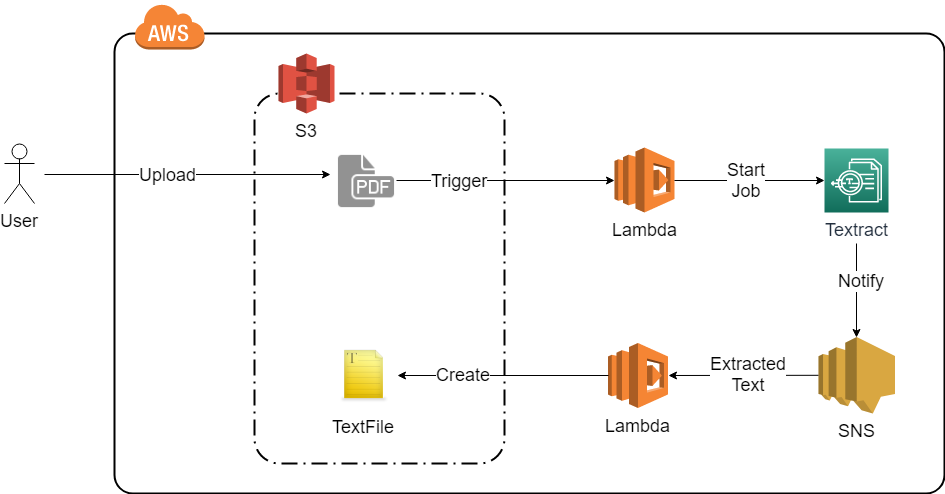
A demo application will be deployed using Serverless Framework (See figure 02).
The basic functionality of the demo application will be really simple. Whenever a PDF document is uploaded to the S3 bucket, a Lambda function will be triggered and it will start a text extraction processing job in AWS Textract service. Once the AWS Textract completes the job, it will send a notification to the AWS Simple Notification Service which will trigger another Lambda function. The triggered Lambda from AWS SNS Service will get the text extraction job result from the payload and write the results to a text file in the S3 bucket with the same name as the PDF.
AWS SDK for Python boto3 is added as a Lambda layer for both Lambdas.
To summarize, when we upload a PDF document to the S3 bucket, it should output a text file with the same name with extracted text content.
The demo application consists of following AWS services which we need to configure in infrastructure as code in Serverless Framework.
- Lamda Service
- Textract Service
- Simple Notification Service
- Simple Storage Service
You can get the code from this Github Repo.
Getting Started
Serverless Framework is installed via Node package manager. Open a command prompt and execute the following command.
npm install -g serverless
Create a new project using following command.
serverless create --template aws-python3 --path Serverless-Framework-AWS-Textract
This will create a project with a sample Python3 based Lambda function. Go into the created “Serverless-Framework-AWS-Textract” directory from command line.
Install the Serverless Framework plugin “serverless-pseudo-parameters” with the following command. This plugin allows access to AWS environment variables easily instead of writing lines of CloudFormation expressions.
npm install serverless-pseudo-parameters
Next Install boto3 Python AWS SDK which is required for Lambda functions using following command.
pip install -t lib/boto3/python boto3
Creating The AWS Infrastructure as Code
Open the serverless.yml file and delete the default content. Following is the break down of main components of the serverless.yml that we’ll be using.
Service
The name of the AWS service (Project).
Custom
This section defines the custom variables that will be used throughout the configuration file.
Value for currentStage variable is taken from environment settings. If a stage such as “dev”, “qa” or “staging” is provided in the Serverless Framework CLI when deploying, that specific value will be used or else the default value “dev”. This variable will be used to tag global AWS resources such as S3 buckets and IAM roles.
S3 buckets are Globally defined resources. Therefor it should be uniquely named.
AWS Account Id where the resources will be deployed is used to make the s3BucketName unique. Note the usage of plugin “serverless-pseudo-parameters” when retrieving AWS Account Id — #{AWS::AccountId}.currentStage is also appended to the s3BucketName.
Same goes for IAM role name which is Globally defined from within the root account.
Tagging resources with current stage allows us to deploy multiple stages in the same AWS account which will be demonstrated at the very end.
Please find more info on variables here.